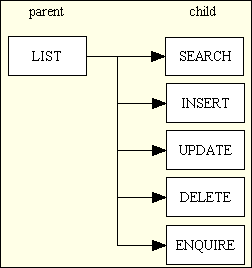
Figure 1 - A typical Family of Forms
In numerous pages on my website I refer to something called a "user transaction", but what exactly does this mean? In my early days in computing I worked on a UNIVAC mainframe where everything was done in batch jobs, and the work carried out by each job was known as a transaction. This was later renamed to user transaction in order to differentiate it from a database transaction which appeared later. A user transaction is also part of a Transaction Processing System where it is described as follows:
In computer science, transaction processing is information processing that is divided into individual, indivisible operations called transactions. Each transaction must succeed or fail as a complete unit; it can never be only partially complete.
This is the description provided in User transactions from microblink.com:
User transactions are actions performed by individuals within a computer system or transactional platform. These actions involve a user interacting with a system to perform specific operations such as making a purchase, accessing or modifying data, or initiating a transfer. User transactions typically involve a series of steps and can vary in complexity depending on the nature of the system and the desired outcome.
There is also this description on the wikipedia article on Online Transaction Processing (OLTP):
The term "transaction" can have two different meanings, both of which might apply: in the realm of computers or database transactions it denotes an atomic change of state, whereas in the realm of business or finance, the term typically denotes an exchange of economic entities (as used by, e.g., Transaction Processing Performance Council or commercial transactions. OLTP may use transactions of the first type to record transactions of the second type.
Other terminology may be used, such as use case or unit of work, or, in the case of the RADICORE framework, a task. Note that in the RADICORE framework a transaction is not limited to an operation that updates the database as sometimes the user wishes to perform a task which does nothing but read from the database and present the information in a particular format.
In an application built using the RADICORE framework every user transaction (task) has the following properties:
Note that there are only 45 reusable page controllers, one for each Transaction Pattern. These can be used multiple times with different Models and Views to produce different results. Note also that there is only one reusable View component which produces HTML output, one for CSV output, and another for PDF output.
While most transactions have a single View, which may take the form of either an HTML document, a CSV file or a PDF file, a small number do not have any visible output at all. This may be because they update the database and leave other tasks to display the result, or they may read the database and output the data to a disk file which may or may not be emailed to someone. Note that no user transaction has more that one View, so it not necessary for a user to choose a transaction and a view separately.
A user transaction may or may not involve a database transaction, but once a database transaction has started, usually when the user presses a SUBMIT button, no further dialog with the user is permitted until that database transaction has ended with either a ROLLBACK or COMMIT. This allows any database locks to be held for the shortest possible time.
During the operation of any task, if a menu button or navigation button is pressed then the current task will be closed without performing any database updates and the new task will be opened. If there are other buttons in the data area, such as a popup button, this will cause the current task to be suspended before the new task is run. When that new task terminates the current task will be reactivated.
It has been suggested that my assertion that a User Transaction is the same as a Use Case is incorrect as a Use Case may be defined as a high-level activity which involves several steps each of which is a separate user transaction. This wikipedia article states the following:
Use cases are a technique for capturing, modeling, and specifying the requirements of a system. A use case corresponds to a set of behaviors that the system may perform in interaction with its actors, and which produces an observable result that contributes to its goals. Actors represent the role that human users or other systems have in the interaction.
Some people say that my grouping of several tasks into a forms family constitutes a single use case, but I disagree. In my early days as a COBOL programmer it was common practice to lump together all the tasks shown below in Figure 1 into a single program which was given the title "Maintain Table X" where "X" could be any one of a number of tables.
Figure 1 - A typical Family of Forms
Each of the components in the above diagram is a hyperlink which will take you to a detailed explanation.
This program then required a mechanism to switch between one of those six modes to another as each mode required a different screen as well as different logic. Because the program contained all the logic for all the modes it was difficult to ensure that the right logic was processed for the right screen. Among the common bugs were executing code that should not be executed, or not executing code that should be executed. A bigger problem arose later on when it became necessary to add Role Based Access Control (RBAC) into the mix as it meant adding even more logic to check that the current user was allowed to access that mode in that program. This added to the problems, so I decided that the only solution was to split each program into smaller subprograms where each one handled just one of those modes. This ensured that each subprogram only contained the screen definitions and logic that it required. It also meant that I could define the RBAC logic in one place so that it could be performed before the subprogram was called instead of after it was called. This led to the creation of my first framework as it was responsible for displaying to the user only those options for which permission has been granted and then to activate each option when it was selected.
In the RADICORE framework it is normal practice to have the parent LIST1 task available on the menu bar while the related child tasks are only available on the navigation bar for the parent. If the parent table has related entries on a child table then a LIST2 for the child table may also appear in the navigation bar for the parent.
When creating a document which requires entries on several database tables, such as a sales order which has any number of sales items, it is necessary to run the Create Order Header task first, followed by the Create Order Item task separately for each order line. Each of those tasks performs its own database transaction as it would be very bad practice to keep a database lock in place while the user processed several screens.
In a large enterprise application the concept of a Sales Order may be more complicated as it may require a large number of related database tables, as shown in Object Associations: Figure 5. While the minimum requirement is for a ORDER_HEADER entry and one or more ORDER_ITEM entries, entries on the other 9 tables are entirely optional. More complicated than this would be the concept of Order Fulfillment which involves multiple tasks raging from Order Entry to Generate Picklist to Pick from Inventory to Assemble Shipment and then Delivery and perhaps Returns. These may require transactions in different subsystems and different databases.
I ignore these multi-part use cases as they do not exist as separate entities within the RADICORE software. These use cases may be documented outside of the system so that the users know what steps are required and how to complete each one, but none of these use cases have their own entries on the MNU_TASK table and therefore cannot be selected from an option on a menu.